


Pikmykid Parent
3.6572.00 Reviews
App Specs
- Version
- 4.5.15
- Updated On
- License
- Free
- Downloads
- 100,000+
- Developer
- Sachi Tech Inc
- Categories
- Productivity
- Platform
- Android
Screenshots

 Analysis by AppCompare
Picking up a child after school sounds simple until the timing changes, the pickup line becomes crowded, or several adults need to stay coordinated. Pikmykid Parent is a free productivity app from Sachi Tech Inc built around that particular family routine. I see it less as a general family organizer and more as a digital companion for parents whose children’s schools use the Pikmykid system.
That distinction matters before you install it. The app can be useful when it fits the school’s pickup process, but it is not automatically a replacement for every messaging app, calendar, or school portal. My view is that its value comes from connecting a parent to an existing dismissal workflow rather than from trying to become an all-purpose parenting tool.
How I Decided Whether It Was Worth Using
I judged the app by the questions I would ask before relying on it during a busy afternoon: Does it make pickup communication clearer? Can it reduce last-minute confusion? Is it practical for families with changing schedules? And does it offer enough advantage over a phone call, a school message, or a shared calendar to justify adding another app?
The store listing places it in productivity, and that is a sensible description. This is not entertainment for children or a broad social network for parents. It is a task-focused tool for managing the parent side of school pickup. It is free, rated for Everyone, and supports devices running Android 7.0 or later. The current version is 4.5.15, so users of older phones should check compatibility before planning around it.
Its public reception is mixed but reasonably established: it holds a 3.7 average from around 900 ratings, with more than 500 written reviews and over 100K installs. I would not treat those figures as a guarantee of a smooth experience, because pickup apps depend heavily on how a school configures and uses the wider system. Still, the activity suggests this is not an obscure experiment that only a handful of families have tried.
The first decision is therefore not simply “Do I need a pickup app?” It is “Does my child’s school actually use Pikmykid in a meaningful way?” If the answer is no, the app’s practical value drops sharply. A parent can download it, but an app designed around a school-linked process cannot create that process on its own.
The school connection comes before the convenience
For a family, the most important part of setup is confirming the school’s expectations. I would want to know whether the school expects parents to use the app for ordinary dismissal, changes in transportation, authorized pickup arrangements, or only selected situations. That answer determines whether Pikmykid Parent becomes a daily tool or something opened only when plans change.
Worth Reading Before You Choose

EA SPORTS FC Mobile 26 Is a Bigger Football Game, but It Takes Time

Flipboard Shows What News Apps Must Do Beyond the Feed

Switching to Android Auto Means Rethinking Your Driving Routine

Google Calendar Makes a Crowded Week Easier to Manage

Ludo King Makes the Most of the Minutes Between Plans

Baby Panda World Brings Quick Play to Modern Phones, but Its Game Library Feels Busy
This is also where the app differs from a normal calendar. A calendar can remind me that pickup is at a certain time, but it does not necessarily reflect the school’s own release procedure. A family chat can tell another adult that plans changed, but it may not be the channel the school watches. Pikmykid Parent is more useful when it sits inside the school’s established routine rather than beside it.
I would also prepare the adults who may need to use it. If one parent handles morning planning and another handles afternoon pickup, both should understand the basic workflow before the first urgent change. The hidden cost of any school-specific app is not the download; it is making sure grandparents, babysitters, and backup drivers know what to do when the usual plan changes.
A realistic afternoon use case
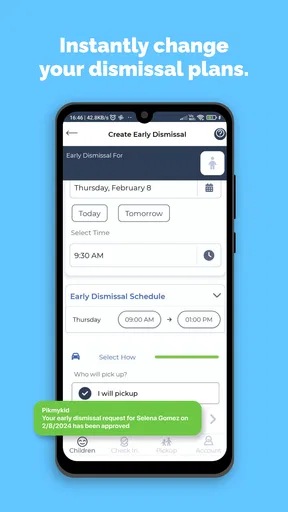
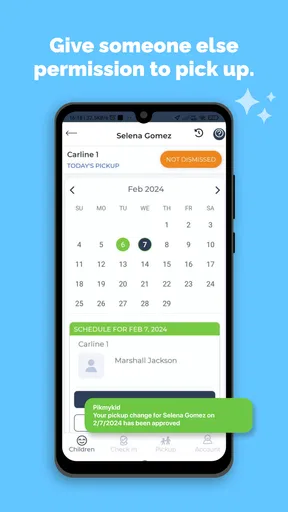
Imagine that I normally collect my child, but a meeting runs late. Instead of relying only on a rushed text, I need to use the school’s accepted process to communicate that another approved adult will handle pickup. The benefit is not merely sending a message. The benefit is placing the change where the school expects to see it, while the other adult knows the plan they are meant to follow.
That scenario shows the app’s strongest potential: reducing the gap between what a parent intends and what the school needs to know. It is especially relevant for families with alternating custody schedules, rotating caregivers, after-school activities, or jobs that make dismissal times unpredictable.
Where Pikmykid Parent Works Best
I’d use this section to help you judge whether the app belongs in your family’s regular pickup routine, rather than treating it as another general-purpose organizer. The key is how often plans shift and whether the school’s process gives each adult a clear role. That distinction makes the difference between a useful daily habit and an app you rarely need.
It focuses on the moment families actually struggle with
Many family apps try to cover meals, chores, calendars, messaging, documents, and reminders. Pikmykid Parent has a narrower purpose, which can be a strength. School pickup is a short daily window, but mistakes during that window create disproportionate stress. A focused app can be easier to justify than a large family-management platform if the school already relies on it.
I particularly like the idea of separating general family conversation from school-facing logistics. A group chat is good for saying “I am running late,” but it can bury important details under unrelated messages. A calendar is good for recurring appointments, but it does not necessarily tell the school who is arriving today. A dedicated parent app gives this specific task a clearer home.
It can make changing plans more deliberate
Last-minute pickup changes are where informal systems become unreliable. People mistype names, forget to tell the right person, or assume that a message has been read. A school-linked workflow encourages the parent to treat the change as an action that needs to be recorded, not just mentioned.
My practical tip is to use it before the situation becomes urgent whenever possible. If I know in the morning that a relative will collect my child, I would handle that change early and then confirm the relative understands the school’s procedure. The app may be most valuable when it turns a vague plan into a visible, intentional handoff.
It suits families with more than one pickup pattern
A fixed schedule is easy to remember until real life interrupts it. Families often have one arrangement on ordinary weekdays, another on activity days, and a third when a caregiver steps in. A parent-focused pickup tool is more relevant when those variations happen often enough that memory and text messages are no longer dependable.
It can also help parents who share responsibility but do not share the same work hours. One adult may make the decision, while another performs the pickup. In that situation, the app is not just a reminder; it becomes part of the handoff between adults.
It is accessible as a free starting point
Because the app is free, the financial barrier to testing it is low. That is important for a school-required tool: parents should not have to buy a separate service simply to participate in dismissal. The Everyone content rating also makes it straightforward to consider in a household where several adults may need access to the same basic process.
Free does not mean frictionless, though. I would still consider the time needed to learn the school’s rules, keep account details available, and explain the process to backup adults. The cost is mainly attention and coordination rather than money.
Small workflow habits make a difference
One non-obvious lesson with a pickup app is that the person changing the plan and the person collecting the child are not always the same person. I would avoid assuming that one notification solves both sides. After recording a change, I would separately confirm that the driver knows the expected arrival details and any identification or school-specific steps.
I would also avoid treating the app as a substitute for checking the school’s instructions. A digital entry can be correct while the adult carrying it out is confused. The strongest workflow combines the app for the school-facing update with a short direct confirmation for the human being doing the pickup.
Where Other Options May Fit Better
I’d look at the alternatives through the specific job they need to do: a calendar can organize a stable schedule, while a call can resolve an unusual or urgent exception. The useful question is whether either option also keeps the school and the pickup adult aligned. That is where a simpler tool may be enough—or where a dedicated workflow has a clear advantage.
A calendar may be enough for stable routines
If my child always leaves with the same parent at the same time and the school does not use Pikmykid, a shared calendar may be simpler. It can handle recurring reminders without asking the family to learn a separate school process. For a predictable household, adding a specialized app could create more maintenance than value.
The trade-off is that a calendar records what the family plans to do; it does not necessarily communicate that plan to the school. I would choose the calendar for private scheduling, but not assume it replaces a school-required dismissal channel.
Messaging apps are faster for informal coordination
Families already use text messages and group chats because everyone knows how they work. They are useful for quick human coordination, especially when a grandparent or babysitter is involved. They are also flexible when the topic is broader than pickup.
The weakness is structure. A message can be missed, misunderstood, or sent to the wrong group. It may also leave the school outside the conversation. If the school expects a formal pickup update, a chat remains a supplement rather than a dependable replacement.
School portals can be broader but less focused
A school portal may combine announcements, grades, attendance, forms, and messages. If the school’s portal already handles dismissal changes clearly, using one broader service may be more convenient than maintaining another app. The advantage is having fewer places to check.
On the other hand, broader portals can make a time-sensitive task compete with many unrelated functions. Pikmykid Parent makes more sense when pickup is the one area where the school has chosen a specialized workflow. I would follow the school’s preferred channel instead of choosing solely by the number of features.
Phone calls still have a role
For an urgent or unusual problem, calling the school office may be better than trying to work out a new digital procedure while standing in traffic. A call gives me a chance to explain an exception and ask what the school wants me to do. The app is better suited to ordinary, recognized changes that fit the school’s process.
This is an important limitation: no app removes the need for judgment. If a child is ill, a pickup person is delayed, or the situation falls outside normal dismissal rules, direct contact may be the safer choice.
The Real Cost of Switching to a Dedicated Pickup App
Since Pikmykid Parent is free, switching does not require a subscription decision. The real cost is adopting one more routine. I would need to remember where pickup changes belong, keep other caregivers informed, and resist the temptation to duplicate every update across several channels without knowing which one the school actually follows.
That duplication is a genuine source of confusion. If I enter a change in the app, send a text, and mention it in a family chat, three records can quickly drift apart. My preferred approach would be to use Pikmykid Parent as the school-facing source when the school requires it, then use a direct message only to make sure the responsible adult understands the plan.
There is also a learning curve for occasional users. A parent who opens the app every day may remember the workflow naturally. A grandparent who uses it once a month may not. Before assigning pickup to an occasional caregiver, I would walk through the process in advance rather than handing over the phone during the busiest part of the afternoon.
Device age can be another practical consideration. The app supports Android 7.0 and above, which covers many older devices, but families using very old phones should verify that installation and normal use are possible before depending on it. I would not wait until an urgent pickup change to discover that a caregiver’s device is incompatible.
The app’s 3.7 average also tells me to keep expectations realistic. A rating like that often reflects varied experiences, and a school-connected product can feel excellent in one community and awkward in another depending on local procedures. I would test it during a normal pickup day, learn how the school responds, and only then make it central to the family routine.
Who should use it
I would recommend trying it if your child’s school actively uses the Pikmykid system, your pickup arrangements change regularly, or several approved adults share dismissal duties. It is also a sensible option for parents who want to keep school-facing logistics separate from noisy family conversations.
It is less compelling for a family with a completely fixed routine, a school that does not use the service, or caregivers who rarely have reliable access to a compatible smartphone. In those cases, a school portal, calendar, phone call, or direct arrangement may be easier. The right choice depends less on how many features an app appears to have and more on whether it matches the way the school actually releases children.
My Recommendation After Using It
I see Pikmykid Parent as a practical specialist rather than a complete family-management solution. Its best quality is its focus on the parent side of school pickup, where a small communication mistake can cause a large amount of stress. When the school supports the system, it can give changing plans a clearer place to live than a calendar or group chat.
I would install it free of charge and try it if my school instructed families to use it. I would first learn the school’s exact expectations, test a routine change before an urgent day, and make sure every backup caregiver understands the process. Those steps matter as much as the app itself.
My final recommendation is therefore conditional but positive: choose Pikmykid Parent when it is part of your school’s real dismissal workflow. It is not the best answer for every family, and it should not replace direct contact when something unusual happens. But for parents managing rotating pickups and last-minute changes, a dedicated school-facing tool can be more dependable than scattered messages and remembered promises.
Pros
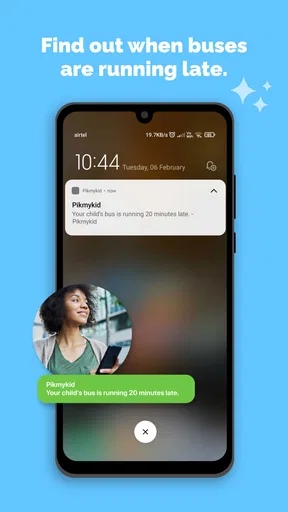
- Real-time bus tracking helps parents estimate arrival times.
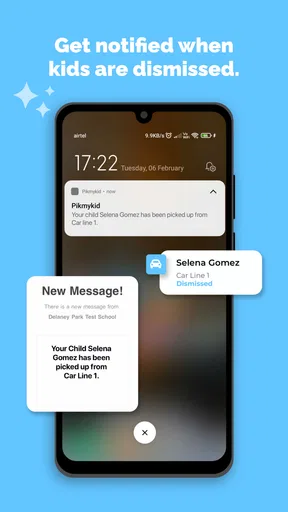
- Push notifications alert families about pickup and transportation updates.
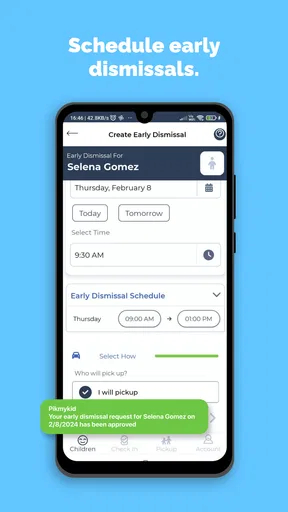
- Quick dismissal requests can simplify end-of-day school pickups.
- Supports safer handoffs by identifying authorized pickup arrangements.
- Useful for coordinating multiple children at participating schools.
Cons
- Features depend heavily on the school’s setup and enabled services.
- Location updates may be delayed by weak GPS or mobile connectivity.
- Some functions require staff approval before changes take effect.
- Parents may receive frequent notifications during busy school periods.
- The interface can feel confusing until families learn the school’s workflow.
FAQs for Pikmykid Parent
What is Pikmykid Parent, and what is it used for?
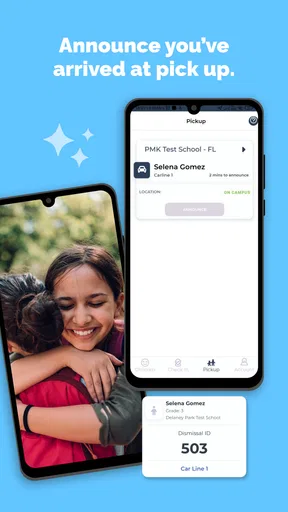
Pikmykid Parent is a school dismissal and student transportation app designed to help families manage pickup arrangements. After connecting with a participating school, parents can view dismissal information, indicate who is collecting their child, send pickup permissions, and receive relevant notifications. Its exact features depend on how the child’s school has configured the platform and which dismissal options it supports.
How do I connect my child’s school and student to the app?
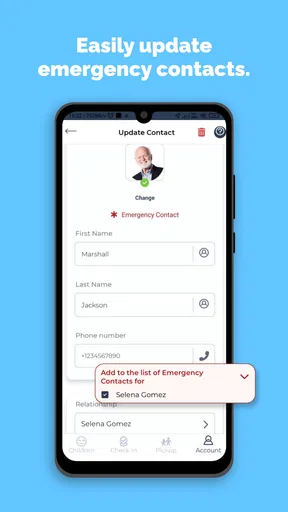
To use Pikmykid Parent, you generally need an account associated with a school that uses Pikmykid for dismissal management. After downloading the app, sign in or create an account using the information requested by the school, then follow the instructions to link your child. If the student does not appear, the name, email address, phone number, or school records may not match, so contacting the school office is usually the fastest solution.
Can I authorize another person to pick up my child?
One of Pikmykid Parent’s most useful functions is the ability to communicate pickup changes and authorize another person, such as a relative, friend, or caregiver, when the school permits it. You can typically provide the person’s details and select the relevant date or dismissal arrangement. However, approval is controlled by the school, and the authorized adult may still need to show identification at pickup.
Does Pikmykid Parent provide real-time pickup notifications?
The app can provide notifications related to dismissal, pickup requests, changes, and school announcements, but the timing and type of alerts depend on the school’s procedures and enabled features. Notifications may also be affected by phone permissions, internet access, battery-saving settings, or disabled background activity. For safety, parents should keep alerts enabled and continue following the school’s official pickup instructions.
Is Pikmykid Parent free, and what permissions does it require?
Pikmykid Parent is generally available to download without a separate subscription for families, although the school’s agreement and selected services may determine what is accessible. The app may request permissions such as notifications, location, camera, or access to contacts, depending on the features being used. Before granting permissions, review the app’s privacy information and enable only what is necessary for your preferred pickup workflow.


